Empowering Tech-Savvy Librarians on a Budget

Tag: Library Technology

  • How the Westhampton Free Library Saved $1,000 Using a 3D Printer for Summer Reading Rewards


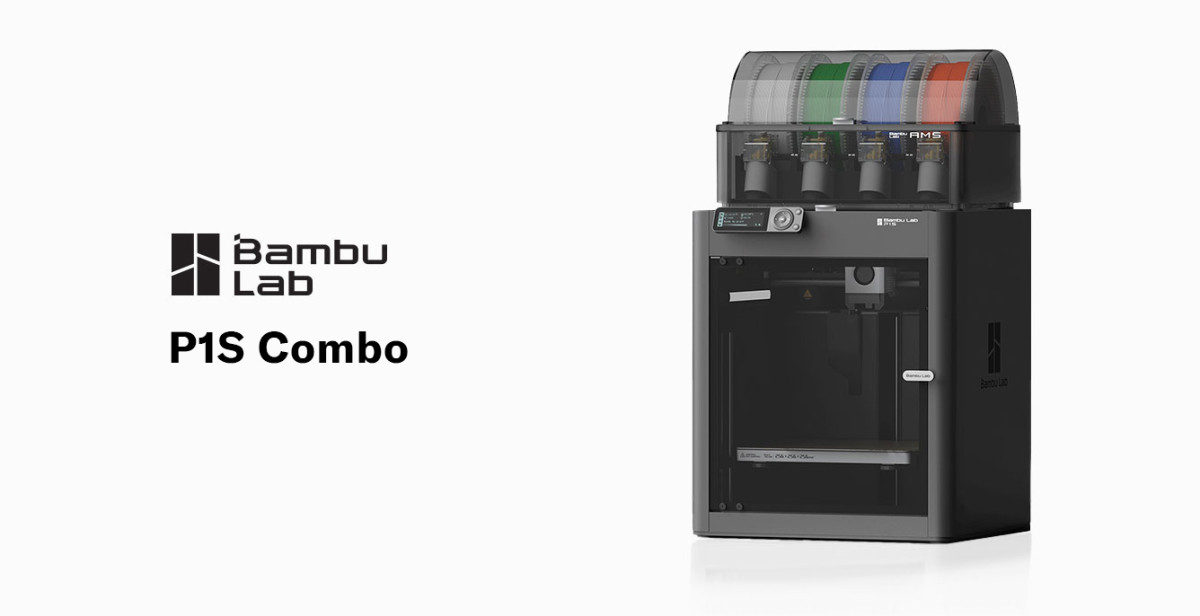
    BamBu Labs P1S 3D Printer

    I know I spoke about this in an earlier post, but today I want to give a case study on how affordable technology, such as 3D printing, benefits libraries. Every library looks for creative ways to stretch tight budgets, especially during big programs like the Summer Reading Club. At the Westhampton Free Library, we found an unlikely hero in our 3D printer—one that saved us over $1,000 in a single project, improved our program experience, and opened the door to new possibilities for future events.

    This is the story of how a simple idea, a spool of filament, and a little patience helped us rethink how libraries can use technology to cut costs and elevate programming.

    The Problem: 1,500 Wooden Coins at $1,000+

    Early in the summer planning process, our Children’s Department approached me with a financial dilemma: “We need to order 1,500 wooden reward coins for the Summer Reading Club.”

    Libraries often use these coins—affectionately called Library Bucks—as part of their summer reading club’s reward and incentive system. Kids collect the tokens as they complete reading challenges and trade them in for small prizes.

    The vendor our Children’s Department typically uses quoted more than $1,000 for the quantity needed. The price wasn’t surprising…but it also wasn’t ideal given our annual programming budget.

    So, instead of clicking “checkout,” we asked a simple question: “Could our 3D printers do this instead?”

    The Solution: A Custom 3D-Printed Coin “Library Bucks.”

    Designing the Coin

    One of our staff members has been learning Blender, a free and open-source 3D creation suite used for modeling, animation, rendering, and visual effects. We tasked her to design a simple round token with the library’s name around the edge, a book symbol in the center, raised edges for durability, and a thickness sturdy enough for kid use.

    Test Printing

    We ran prototypes on our Bambu Lab P1S using standard PLA filament. Each coin used ~1.5–2 grams of filament and took ~3 minutes to print. After a few iterations, we had a coin that was durable, polished, and easy to produce.

    The Print Run: A Thousand Coins, Zero Stress

    Batch Printing

    Each morning, we printed a batch of 25–30 coins, another batch after lunch, and one last batch before the library closed. This made the process incredibly efficient, enabling the project to be completed in less than a month.

    Performance

    Our Bambu printers ran continuously with no adhesion issues, very few failures, and consistent quality.

    The Final Result: A Huge Cost Savings + Better Patron Experience

    💰 Total Savings: Over $1000

    Estimated filament usage: ~4 kg
    Estimated filament cost: $75–$100

    🎨 Full Customization

    We were able to:

    • Add the library name
    • Customize the design
    • Personalize colors
    • Experiment with size and thickness

    🎉 Kid Appeal

    Kids loved the coins, with many asking, “Did the library make these?”

    🛠️ Future-Proofing

    Because we own the STL file, we can easily reuse or modify the design for:

    • Future SRC programs
    • Teen contests
    • Children’s games
    • Scavenger hunts
    • Makerspace events

    The Unexpected Benefits

    1. A Showcase of Technology

    Families saw the printers running before, during, and after the Summer Reading Club, sparking questions and interest in 3D printing.

    2. Cross-Department Collaboration

    The project strengthened collaboration between:

    • Children’s Services
    • Technology Services
    • Circulation

    3. A Proof-of-Concept for Future Savings

    Now, staff regularly brainstorm new items we could print rather than purchase.

    Cost Breakdown

    Item Vendor Cost 3D Printing  Cost
    1,500 wooden coins ~$1,500 ~$75–100 PLA
    Shipping $50–$100 $0
    Customization Extra fee Free
    Total ~$1,500+ ~$100

    Total Savings: ~$1,400

    Tips for Libraries Wanting To Replicate This Project

    • Use a reliable, fast printer (Bambu Lab P1S or Prusa MK4S recommended)
    • Keep the design simple for fast, clean printing
    • Batch your prints to reduce staff oversight
    • Use PLA filament for durability and ease of use
    • Save your STL files for future reuse and adaptation

    Final Thoughts

    This project wasn’t just about saving money. It showcased how technology can reshape library operations and improve programming.

    At the Westhampton Free Library, a project that once cost over $1,000 now costs about $100—and the results were better, more customizable, and more engaging for our patrons.

    3D printers aren’t just for MakerSpaces; they’re powerful tools that help libraries stretch budgets, rethink supplies, and build innovative programs for the community.

    And sometimes, they help you save a thousand dollars in the process.
  • Using Raspberry Pis as Low-Cost Technology Tools

    Using Raspberry Pis as Low-Cost Technology Tools banner

    Raspberry Pis: Affordable, Flexible, and Built for Creativity

    Raspberry Pis are single-board computers (SBCs) — compact systems that fit an entire computer onto a circuit board the size of a deck of cards. They’re designed with affordability and flexibility in mind, making them a favorite among educators, hobbyists, and budget-conscious technologists.

    A Raspberry Pi typically costs between $35 and $80. Yet, it includes everything needed to run a complete Linux-based operating system, connect to the internet, and power displays, sensors, and other peripherals. This combination of low cost, open hardware, and community-driven support has made the Raspberry Pi a go-to solution for do-it-yourself (DIY) technology projects in libraries, classrooms, and MakerSpaces.

    Libraries, in particular, benefit from their adaptability—a single Raspberry Pi can serve as a public terminal, digital signage player, coding workstation, or IoT controller. With an ever-growing ecosystem of tutorials and accessories, these little boards can stretch a technology budget further than almost any other device on the market.


    Learn by Doing

    The Raspberry Pi encourages an active, hands-on learning approach. Instead of passively reading about computers, you build and experiment with one directly, all without the worry of breaking more expensive, mission-critical hardware.

    From the moment you install the operating system to connecting sensors or writing your first Python script, the Pi makes technology tangible and interactive. It teaches troubleshooting, logic, and creative problem-solving—skills that are invaluable for both staff and patrons in a library setting.

    Libraries can use Raspberry Pis to teach digital literacy and STEAM skills:

    • Let patrons explore coding in Scratch or Python.

    • Host “build your own computer” workshops, where participants assemble and boot their own Pi.

    • Create technology petting zoos where visitors can safely experiment with hardware and coding without fear of “breaking” anything important.

    The experience of tinkering, failing, and iterating builds confidence—the very essence of learning by doing.


    Digital Signage

    Instead of paying for commercial display systems, a Raspberry Pi can drive a wall-mounted monitor using free tools like Screenly or Yodeck.

    At the Westhampton Free Library, we take this a step further using GoBoard—an open-source, cross-platform digital signage server created by my colleague Walter Pesce. It’s a great example of how open-source software and affordable hardware can combine to create sustainable, customized solutions for libraries on a tight budget!


    Public Terminals or OPAC Stations

    Many libraries have old PC accessories—monitors, keyboards, mice—collecting dust. A Raspberry Pi can bring them back to life as OPACS or public browsing/email stations.

    As I discussed in my previous post, Repurposing Older PCs as OPAC Stations with Debian Linux and OpenKiosk, you can install OpenKiosk on Raspbian (the Pi’s Debian-based OS) to create an inexpensive and locked-down OPAC station.

    It’s a simple, cost-effective way to expand public access without purchasing expensive new computers.


    STEAM Education

    Raspberry Pis are perfect for Maker and STEAM programming. They support popular educational tools like Scratch (for block-based coding) and Python (for text-based coding), allowing learners to build games, automate devices, or explore robotics.

    Projects like blinking an LED, running a weather station, or programming a robot arm all become accessible with a Pi and a few low-cost components. Libraries can use these projects to inspire curiosity and creativity among kids, teens, and adults.


    Project Ideas for Libraries

    If you’re wondering how Raspberry Pis can be used in your library, here are a few practical and creative project ideas that make the most of their flexibility:

    • 🖥️ Program / Event Display Board: Mount a monitor in your lobby that automatically shows upcoming programs, weather, or local community news.

    • 📚 OPAC Station: Combine a Raspberry Pi and OpenKiosk to let patrons search the catalog.

    • 🔧 STEAM Maker Kit: Create checkout kits that include a Raspberry Pi, keyboard, mouse, and preloaded coding tutorials for learning at home.

    • 📷 Photo Booth or Green Screen Station: Set up a Pi with a USB camera and free software like PiCamera for fun community photo projects.

    • 🏫 Library Server Sandbox: Use a Pi as a small web server to teach basic web hosting, HTML editing, or even run a mini intranet for staff.

    These small, low-cost experiments can have an enormous impact on learning and community engagement.


    Final Thoughts

    The big takeaway is simple: Raspberry Pis stretch tight budgets. They’re inexpensive, versatile, and educational—but they’re not meant to replace full desktop PCs. Think of them as flexible building blocks for creative, low-cost tech solutions that can make a big impact in public libraries.

    And if you want to take things further, you can explore more powerful single-board computers (SBCs) like the Odroid, Rock 5, or GMKtec Mini PC, which can handle heavier workloads while still keeping costs somewhat reasonable.


    Resources

    Here are a few places to start if you’d like to explore Raspberry Pi projects or set one up in your library: